# ACROME SMD

SMD (Smart Motion Devices) is a **modular** product platform designed to simplify the develop of robotics and automation systems in terms of **electronics, software and mechanics**.

<figure><img src="https://1077748559-files.gitbook.io/~/files/v0/b/gitbook-x-prod.appspot.com/o/spaces%2F-LuxEcL3mxZNc5Aa92N6%2Fuploads%2FU26TbK1OBmGWveII1PKO%2Faas-ezgif.com-video-to-gif-converter.gif?alt=media&#x26;token=38462854-6bf2-4583-aa55-1a21a19ae126" alt=""><figcaption></figcaption></figure>

You can **design and build** many different robotic systems using the wide range of SMD products. **Robust and modular** hardware allows repeated use for different needs and scenarios

<figure><img src="https://1077748559-files.gitbook.io/~/files/v0/b/gitbook-x-prod.appspot.com/o/spaces%2F-LuxEcL3mxZNc5Aa92N6%2Fuploads%2FB3OWxMQIpTnJLyNftGak%2Fgitbook%20languages.jpg?alt=media&#x26;token=06c0c603-6d92-4d37-b3e4-279721d20b5b" alt=""><figcaption></figcaption></figure>

SMD is suitable for users of all levels, from **beginners to professionals**.The SMD platform has libraries for different coding languages. Therefore, you can constantly use the SMD platform as you develop yourself in the field of robotics

<table data-header-hidden><thead><tr><th width="239" valign="top"></th><th width="170" valign="top"></th><th width="356" valign="top"></th></tr></thead><tbody><tr><td valign="top"><strong>Operating System / Environment</strong></td><td valign="top"><strong>Compatible Gateway</strong></td><td valign="top"><strong>Notes</strong></td></tr><tr><td valign="top">Windows 10 / 11</td><td valign="top">USB Gateway</td><td valign="top">Ideal for development with GUI, SDK, Blockly, ROS support limited(via WSL/Docker)</td></tr><tr><td valign="top">macOS 11+</td><td valign="top">USB Gateway</td><td valign="top">Supports serial comm. via USB, Blockly Support, ROS support limited(via Docker)</td></tr><tr><td valign="top">Ubuntu / Debian / Arch</td><td valign="top">USB Gateway</td><td valign="top">Perfect for ROS, scripting, SDK, Blockly Support</td></tr><tr><td valign="top">Raspberry Pi OS / Ubuntu</td><td valign="top">USB Gateway</td><td valign="top">Lightweight, Python &#x26; Blockly ready, Blockly Support, ROS support </td></tr><tr><td valign="top">JetPack (Ubuntu)</td><td valign="top">USB Gateway</td><td valign="top">AI + motion fusion, ROS support, Blockly Support</td></tr><tr><td valign="top">Arduino IDE</td><td valign="top">Arduino Gateway</td><td valign="top">Basic UART, embedded control</td></tr><tr><td valign="top">Arduino / MicroPython</td><td valign="top">Arduino Gateway</td><td valign="top">UART-over-USB, wireless use</td></tr><tr><td valign="top">STM32CubeIDE / PlatformIO</td><td valign="top">Manual UART Wiring</td><td valign="top">Advanced only, manual UART</td></tr><tr><td valign="top">Arduino IDE / PlatformIO</td><td valign="top">Arduino Gateway</td><td valign="top">Fast embedded control</td></tr><tr><td valign="top">Debian Linux</td><td valign="top">USB Gateway</td><td valign="top">Industrial Linux robotics, Blockly Support, ROS support </td></tr></tbody></table>

**Note:** The table above applies to all products in the **SMD family**, including SMD Red, SMD Blue, and SMD Green.

<figure><img src="https://1077748559-files.gitbook.io/~/files/v0/b/gitbook-x-prod.appspot.com/o/spaces%2F-LuxEcL3mxZNc5Aa92N6%2Fuploads%2FWWikKGKx0YfQhcGSUfPa%2FSMD%20Topoloji%20ASKHAN.png?alt=media&#x26;token=ba42fa00-5069-4aae-ac64-f50e3cc75e30" alt=""><figcaption></figcaption></figure>

Electronic components of the SMD platform are divided into three groups: **Gateway modules, Motor Driver Cards** and **Add-on Modules**.While gateway modules provide connection with the computer or Arduino, the motor driver cards drive different types of motors. Add-on modules connected to motor driver cards collect data from the environment with various sensors and components and give feedback.

<figure><img src="https://1077748559-files.gitbook.io/~/files/v0/b/gitbook-x-prod.appspot.com/o/spaces%2F-LuxEcL3mxZNc5Aa92N6%2Fuploads%2F64EaioIwAM1HZdm5BqQa%2FUSB%20Gateway%20Module%20Compatible.bip.676.jpg?alt=media&#x26;token=5856cd5e-1806-427f-bc0f-aae90c34a413" alt=""><figcaption></figcaption></figure>

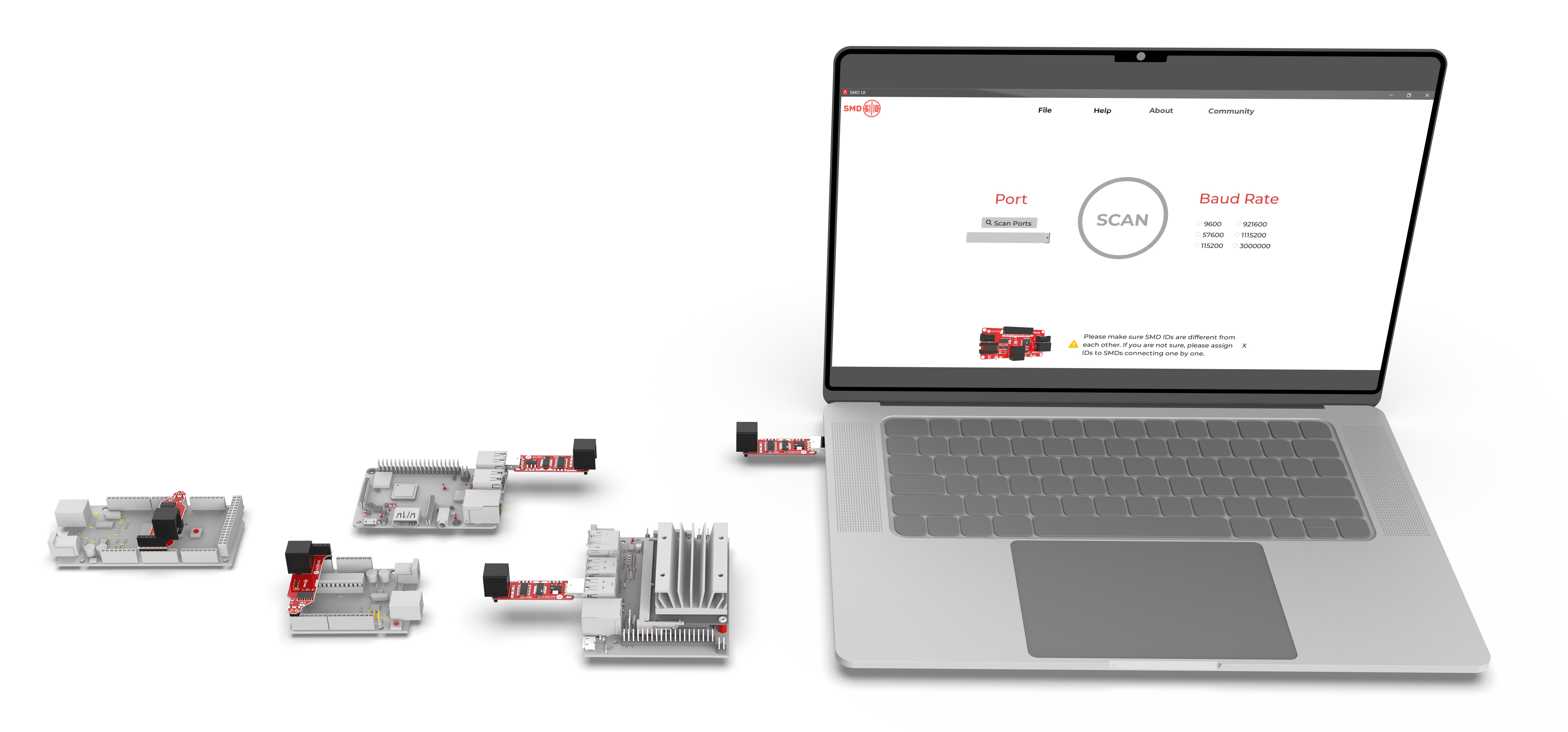
With USB Gateway and Arduino Gateway, you can connect SMD products to **Raspberry Pi, Jetson, PC** and **Arduino**. SMD motor driver cards drive the motor with the **processor** on it. This alleviates the **processing load** of the connected computer or microcontrollers.

<figure><img src="https://1077748559-files.gitbook.io/~/files/v0/b/gitbook-x-prod.appspot.com/o/spaces%2F-LuxEcL3mxZNc5Aa92N6%2Fuploads%2Fp0gUyvAXioPWKc3r4DH1%2Fbanner%20robotshop.683.jpg?alt=media&#x26;token=8b6f5e54-89ef-45f4-8638-d4bf800f7e08" alt=""><figcaption></figcaption></figure>

SMD cards can be connected to each other in a **daisychain**. While motor driver cards communicate with the **RS485** protocol, add-on modules connected to the driver cards communicate with the **I2C** protocol.

<figure><img src="https://1077748559-files.gitbook.io/~/files/v0/b/gitbook-x-prod.appspot.com/o/spaces%2F-LuxEcL3mxZNc5Aa92N6%2Fuploads%2Fi7JoZ0iKzoEG7vK1WhUq%2Funtitled.284.jpg?alt=media&#x26;token=44ed10af-9f48-44f7-a243-9b475f9f2172" alt=""><figcaption></figcaption></figure>

SMD mechanical parts consist of **plates, joints, wheels** and **mounts**. By combining these parts, you can quickly implement your projects. When designing mechanical parts, responding to the **user's demands** and **long-term use** were prioritized.

\ <br>

<figure><img src="https://1077748559-files.gitbook.io/~/files/v0/b/gitbook-x-prod.appspot.com/o/spaces%2F-LuxEcL3mxZNc5Aa92N6%2Fuploads%2FaKEiCjQ29KcaqE7AiRv5%2F0131-ezgif.com-video-to-gif-converter%20(1).gif?alt=media&#x26;token=74226756-ed61-4846-b64e-c8482cecda30" alt=""><figcaption></figcaption></figure>

**3D designs** of electronic and mechanical parts of the SMD platform can be accessed through this document. With these designs, you will spend minimal effort while designing your robotic system and you can design without purchasing.

## Quick links

{% embed url="<https://acrome.net>" %}

{% embed url="<https://www.robotshop.com/es/collections/acrome?srsltid=AfmBOorqAuu3ddyq-b40rO6oylhyn1bQYpu6xqzrjEyOXtUm_g-VhUJl>" %}

## Get Started

We've put together some helpful guides for you to get setup with our product quickly and easily.

{% embed url="<https://www.instructables.com/member/Acrome+Robotics/>" %}

{% content-ref url="help/reach-us" %}
[reach-us](https://docs.acrome.net/help/reach-us)
{% endcontent-ref %}